

The same PLANC you know and love, but with a fresh new look, improved functionality, and more powerful than ever before.
In this article we are going to briefly explore what the next generation of permit management looks like, and what can you expect to see in PLANC Manager 2.0.
New Look

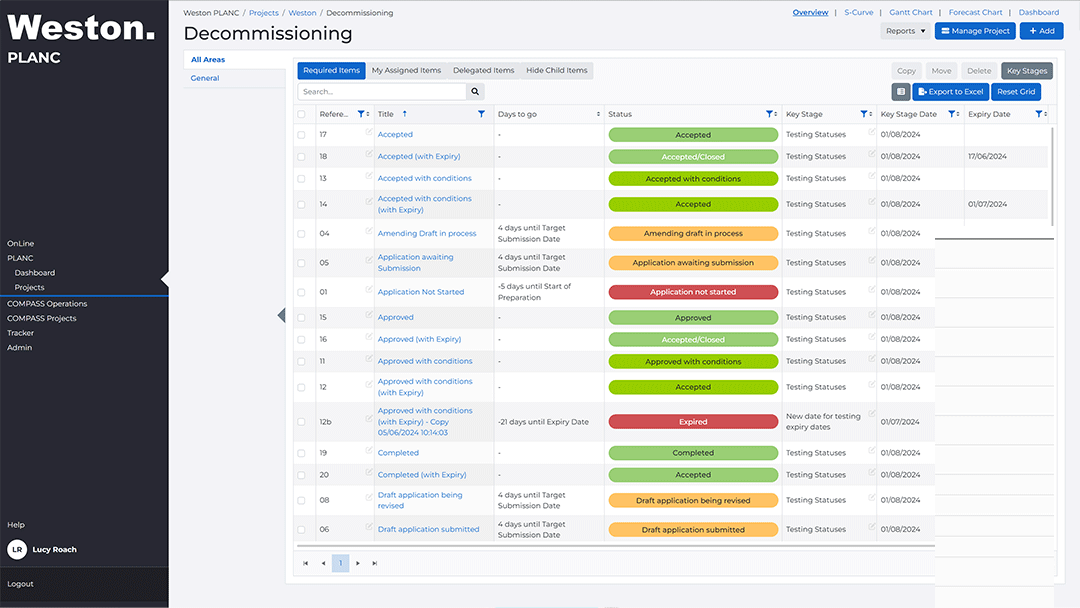
We have completely revamped PLANC Manager, giving it a sleek, modern, and user-friendly design. Say goodbye to the frustrating dropdown menus of the past.
The new interface offers intuitive navigation, enhanced accessibility, and a seamless user experience. You’ll find that tasks are easier to manage and project information is more accessible than ever before.
However, we wanted to ensure users don’t feel lost in this new environment, so we kept all fundamental functionalities of PLANC Manager in their familiar places. Everything you’ve gotten used to over the years remains intact, ensuring a smooth transition to the new and improved PLANC Manager.
Make it Your Own
We wanted to ensure that users can easily customize the layout and behavior of their PLANC project, making the information easier to interpret. With PLANC 2.0, you have the power to tailor your workspace to suit your needs. Arrange the overview screen layout, create your own personalized reports, and make project templates in minutes.
Make PLANC work exactly how you want, helping you stay organized and efficient. A truly customizable experience that puts you in control.
Overview Screen

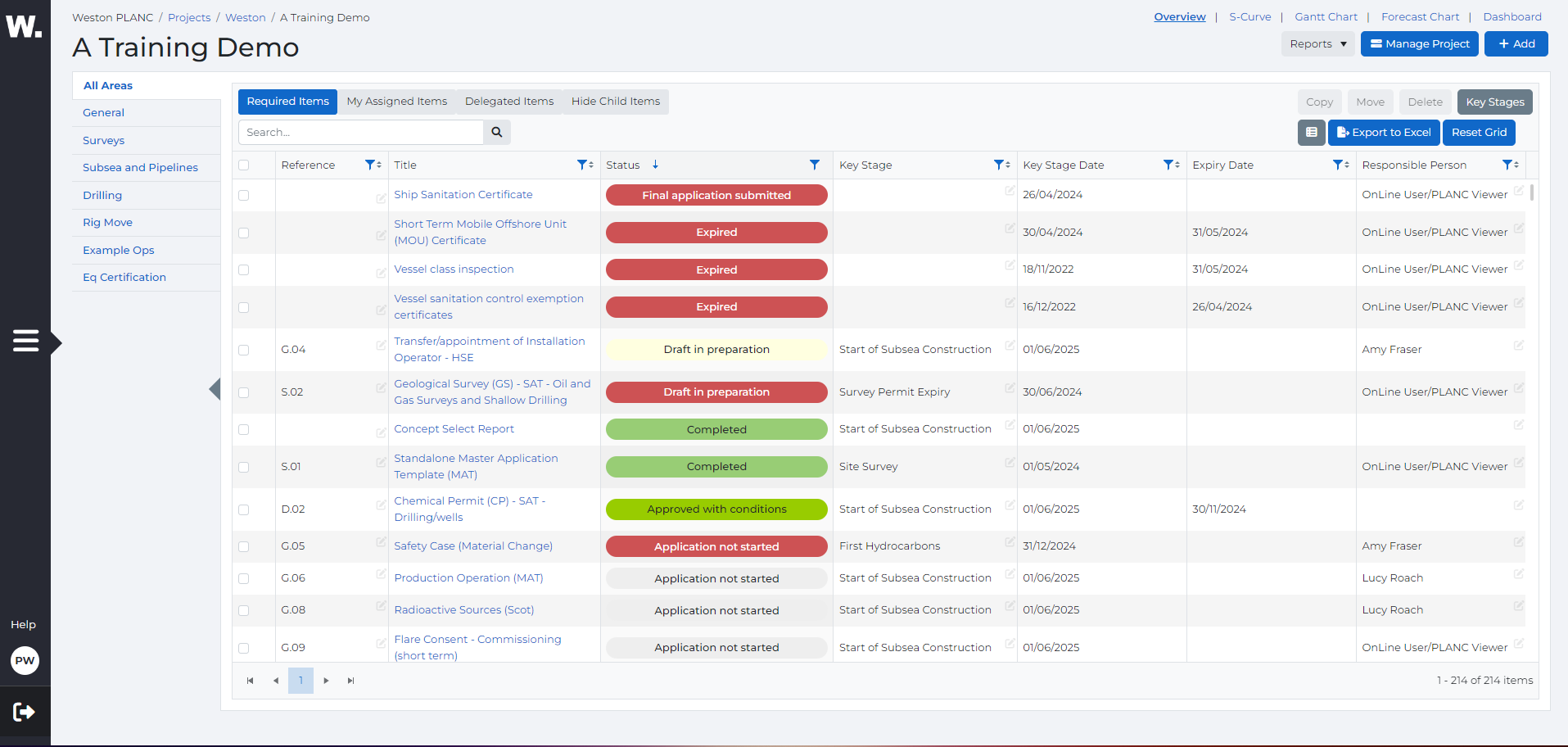
Users can now easily arrange the layout of your overview screen. Grab and drag columns to your desired location, create your own layouts, making it easier to interpret information.
Use the reset grid button to start fresh whenever you need. Expand the overview table for a more detailed view, making the item information more visible.
Project Management

Effortlessly organize your project areas with our new drag-and-drop functionality.
Choose What Takes Center Stage
PLANC Manager now benefits from our new system interface, initially introduced with the launch of New OnLine. This upgrade allows users to collapse the side menu and expand the main section, significantly improving visibility and giving you the ability to decide what is important.



Additionally, all reporting pages (including the Overview page, S-Curve, and Gantt Chart) can now further expand the working area by collapsing the project areas side bar. This feature ensures you have a clear, focused view of the critical data and tools you need, enhancing your ability to manage projects efficiently and effectively.

Improved User Experience
We have added a number of functionalities to help project management be easier and quicker.
Quickly Update Items

Users can now edit items directly from the overview table without going into each PLANC item. This allows better sorting and ordering of items.
Store Account-specific Users
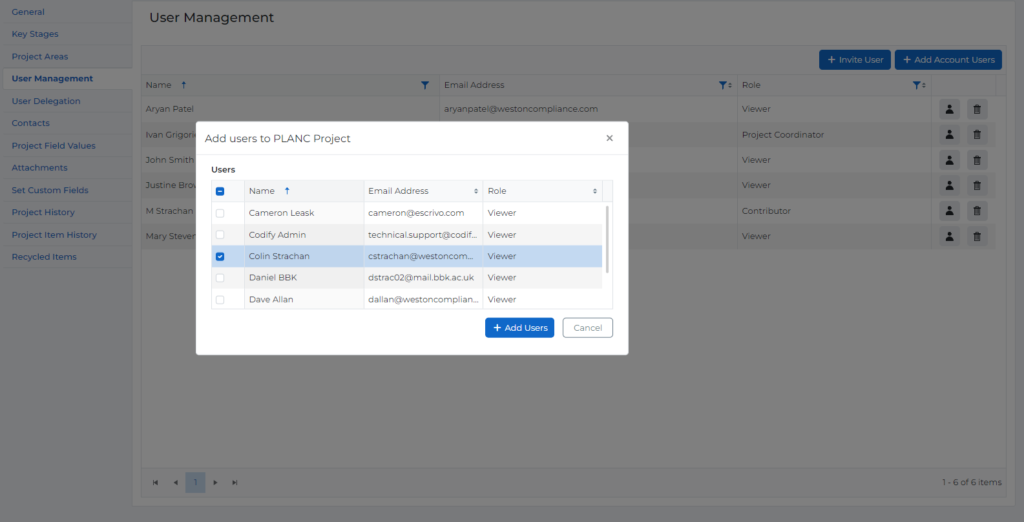
Certain users can now be stored at an account-specific level, allowing for seamless integration across multiple PLANC projects. This means you no longer have to re-add users for each new PLANC project.
Simply add your key team members once, and effortlessly assign them to various projects as needed. This streamlined approach saves time and ensures consistency, making team management more efficient and less repetitive.
Store Authority Contacts
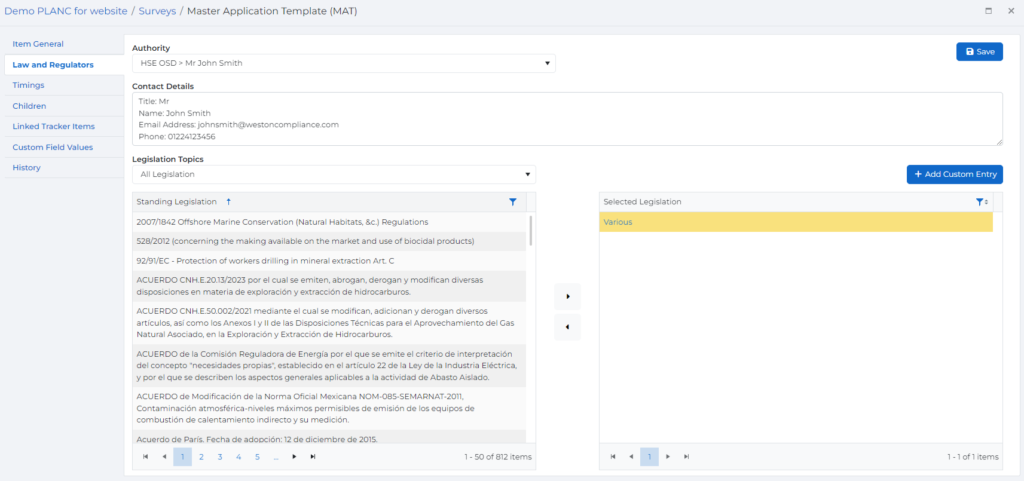
Specific authority contacts can now be easily selected for each individual PLANC item.
This enhancement allows you to quickly assign and manage relevant contacts, ensuring that communication and compliance are streamlined.
More Granular Sorting

The new sorting functionality in PLANC 2.0 allows you to find exactly what you’re looking for with ease. Use advanced filters such as “contains,” “ends with,” or “does not contain” to precisely narrow down your search results.
PLANC Items Screen
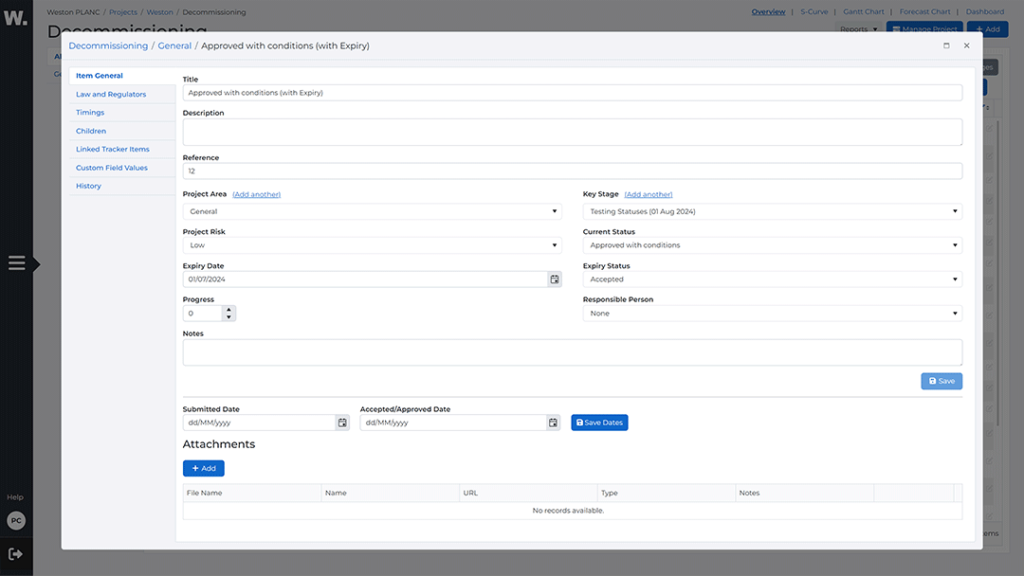
We wanted to make sure everything you need is just a few clicks away. To achieve this, we’ve added more quick options on the General screen and redesigned the PLANC Item screen to behave like a pop-up.

Users can now resize and move the Item window, offering greater flexibility and convenience.
Timings

We have improved the readability and clarity of the timings tab, where users can change the forecast submission and approval dates. These forecast dates will appear in both the S-Curve and the Forecast Chart, providing a clear visual representation of your project’s timeline.

Additionally, we’ve added informative tooltip buttons to the timings page. These tooltips provide explanations for each stage of the submission and approval process, ensuring that users never have to second-guess the information.
Simply hover over the tooltip buttons for a quick refresher on what each stage entails.
The Legislation Screen

We’ve made some well-deserved improvements to the Legislation page.
Users can now filter relevant legislation items with ease, making it simpler to find and apply the regulations that matter most to your projects.
Enhanced and More Detailed Reporting
We’ve significantly upgraded the reporting capabilities in PLANC 2.0, ensuring you get the most out of every feature.
The S-Curve has been refined to offer better readability and more detailed tracking of project progress.

This new feature allows users to better compare their planned performance against their ongoing permitting strategy, providing deeper insights into project progress and helping you adjust your plans for optimal outcomes.
We’ve revitalized the GANTT Chart, making it more intuitive and interactive, so managing your project timelines is easier than ever.

Additionally, we’ve introduced a brand-new feature – the Forecast Chart.

This powerful tool allows you to project future milestones and compare them against your initial plans, giving you a clearer picture of your project’s trajectory. These enhancements ensure you have the comprehensive data you need to make informed decisions and keep your projects on course.
New and Improved Admin Page
Account Administrators and Project Coordinators now benefit from a centralized page with enhanced readability and accessibility of account-specific information and settings. Easily invite internal and external users to the PLANC register, create and reuse customized project templates, and group PLANC items based on similar topics.
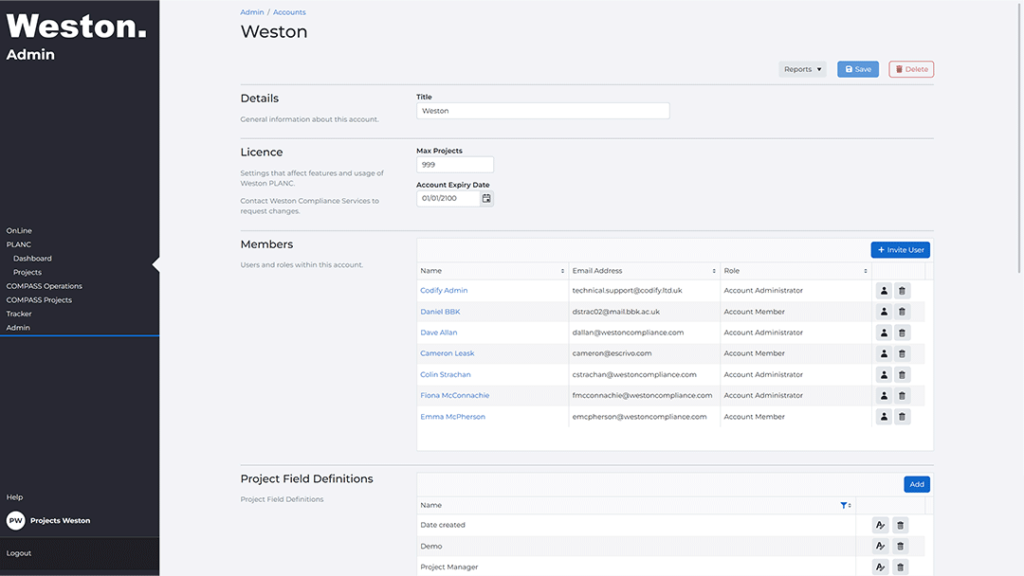
Lastly, admins can send out account-wide email notifications or announcements to users across various projects and systems, including OnLine, PLANC, and COMPASS. This streamlined approach ensures efficient communication and coordination throughout your organization.

Training Sessions
To help you get up to speed with the new features and functionalities of PLANC 2.0, all existing users have their training slots organized for next week. These sessions are designed to ensure you make the most of the new PLANC Manager platform.
If you have any questions regarding your company’s training session, please contact us at emcpherson@westoncompliance.com
Reporting Issues
We are committed to making PLANC better together. If you experience any issues or have any questions, please contact us at techsupport@westoncompliance.com